Arabic-English Bilingual Print Design: Layout Rules That Avoid Costly Mistakes
Arabic-English bilingual print design has to manage two scripts that run in opposite directions on the same page, which is what causes most of the costly mistakes buyers see in finished print. Arabic reads right to left, English reads left to right, and getting the layout, fonts, and translation wrong is far more expensive to fix after printing than before. This guide sets out the layout rules that keep bilingual print correct the first time.
This is a design and process guide, not a translation service. Always supply final, proofread Arabic text from a qualified translator or native speaker, since layout rules alone can't fix incorrect translation.
Why Bilingual Layout Is Harder Than It Looks?
A document with two languages isn't simply an English layout with Arabic text dropped in. Because Arabic runs right to left and English runs left to right, a genuinely bilingual piece often needs its structure mirrored, not just its text swapped, for the reading experience to feel natural in both languages rather than correct in one and awkward in the other.
This is where most mistakes happen. A designer working primarily in English tools can accidentally leave English-style left-to-right structure, page numbering, or reading order in a supposedly bilingual document, which reads backwards or confusing to an Arabic-first reader. Getting this right from the start avoids a costly reprint later.
Choosing a Layout Structure
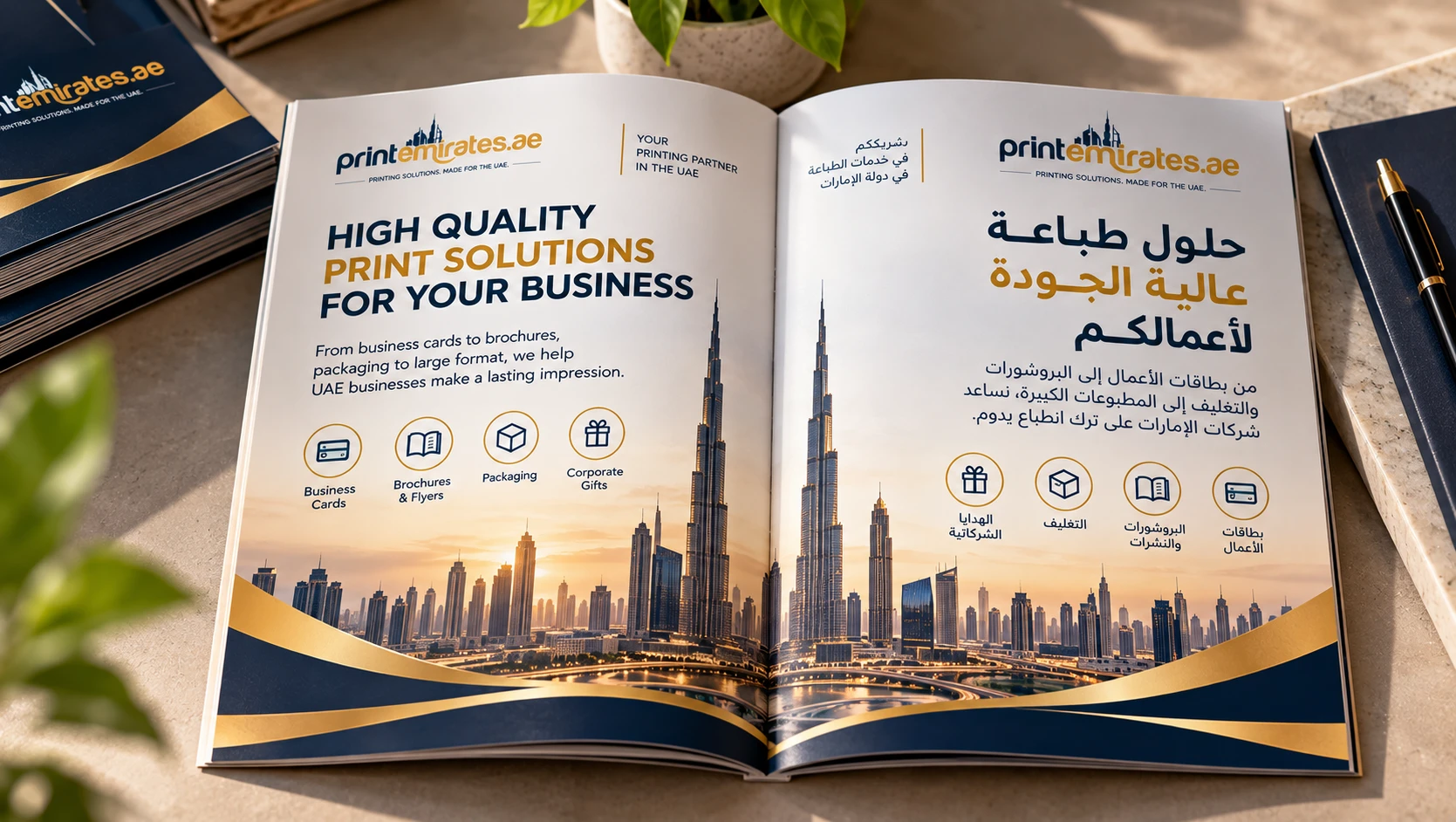
There are two common structures for bilingual print. The first is a mirrored, back-to-back layout, common for brochures and booklets, where the Arabic version starts from what would be the "back" of an English document and the two meet in the middle or run as two separate sections read from opposite covers. The second is a side-by-side layout, common for business cards, flyers, and single-page documents, where English sits on one side and Arabic on the other, or both languages sit on the same page in clearly separated zones.
Decide the structure before design work begins, since it affects page count, binding, and even the printed cover orientation for booklets and brochures. Changing structure midway through a project usually means starting the layout over.
Business Cards: A Simple Case
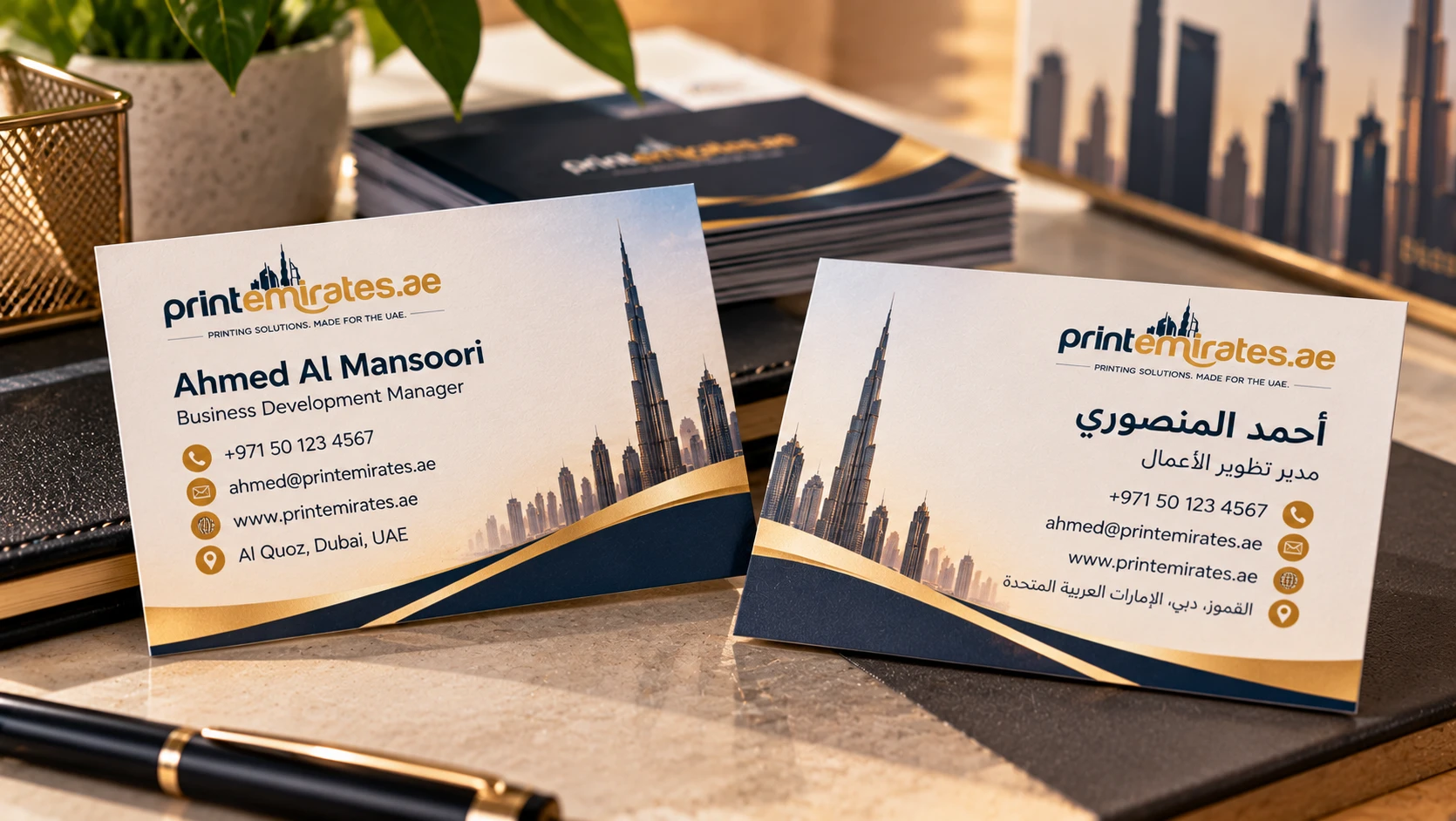
For a business card, the most common approach is one language per side: English on one face, Arabic on the other, each laid out entirely in that language's natural reading direction. This avoids the crowding and visual confusion of trying to fit both scripts onto a single small surface, and it lets each side be typeset properly for its own script. See Business Cards for size and stock options.
Brochures and Multi-Page Documents
For a multi-page brochure or catalogue, mirroring the whole document is usually the cleanest solution: the English version reads left to right from its cover, and the Arabic version reads right to left from what is physically the opposite cover, meeting in the middle or printed as two separate booklets. This lets each language use its natural page-turning direction, rather than forcing an Arabic reader to flip pages in the "wrong" direction throughout.
Page numbering, table of contents, and any navigational elements need to follow the same mirrored logic, positioned and ordered correctly for each language's natural reading flow.
Font Selection for Arabic
Not every font that displays Arabic characters is well-suited to print. Arabic script requires letterforms with connected, flowing strokes and correct joining between characters, and a poorly chosen or converted font can distort these connections, producing text that's technically correct but visually broken. Use a font specifically designed and tested for Arabic typesetting, and confirm this with your designer or printer before finalizing artwork rather than after a proof reveals a problem.
Font size also behaves differently between scripts. Arabic script often needs to be set slightly larger than the equivalent English point size to maintain comparable legibility, since the visual weight and complexity of Arabic letterforms differ from Latin ones. Don't simply match point sizes between the two languages and assume the result will look balanced.
Envelopes and Letterheads: Directional Details
Stationery items carry their own small but easy-to-miss details. On a bilingual envelope, the return address and stamp position conventionally sit differently depending on which language leads the design, and getting this backwards can look subtly wrong even if every word is correct. On a letterhead, the logo, contact details and letter body all need consistent alignment for whichever language the specific letter is written in, which sometimes means producing two separate bilingual letterhead templates rather than forcing one layout to serve both directions equally well. See Letterheads and Envelopes for format options.
Common Layout Mistakes That Cost Money
Mirroring only the text, not the layout. Logos, page numbers, and navigational elements need to follow the reading direction too, not just the body text.
Using a font not built for Arabic. A converted or unsuitable font can distort letter connections, which only becomes visible clearly once printed.
Machine-translated text used as final copy. Automated translation often produces grammatically awkward or simply incorrect Arabic. Always use a qualified human translator for anything going to print.
Matching point sizes across scripts. Arabic and English rarely look balanced at identical point sizes. Adjust for visual weight, not just numeric size.
Approving a proof without a native Arabic speaker reviewing it. A spelling or spacing error can be invisible to someone who doesn't read Arabic fluently, so build a proper review step into your process.
Proofreading and Approval Process
Because a layout or translation mistake is far more expensive to fix after printing than before, build a formal proofreading step into every bilingual project. Have a native Arabic speaker, ideally someone not involved in creating the original translation, review the final laid-out proof specifically for the Arabic content, checking spelling, spacing, punctuation and that the text reads naturally rather than as a literal translation.
Do the same check for the English content, and confirm that both versions convey the same core message, even if the wording isn't a literal word-for-word match. A good bilingual translation often needs to adapt phrasing to sound natural in each language rather than mirror the other exactly.
Color, Imagery, and Cultural Considerations
Beyond text, consider whether imagery and layout choices work equally well for both audiences. An image with directional movement, such as an arrow or a person's gaze, can feel oddly placed if the layout is mirrored for Arabic but the image wasn't adjusted to match. Similarly, color associations and cultural context can differ between audiences, so a design that works well for one language's readers may need small adjustments in imagery or emphasis for the other, particularly for consumer-facing material.
Numbers, Dates, and Punctuation
A detail that trips up even careful bilingual layouts is how numbers, dates, and punctuation behave inside right-to-left text. Numerals themselves are typically written left to right even within an Arabic sentence, which means a phone number or a date sitting inside Arabic text doesn't simply flip along with the surrounding words. Punctuation marks, such as commas and question marks, also have Arabic-specific forms in some contexts. These small details are exactly the kind a design tool won't catch automatically, which is another reason a native-speaker proof matters more for bilingual work than for a single-language project.
Working With Your Printer on Bilingual Artwork
Tell your printer at the briefing stage that the job is bilingual, not just at the artwork submission stage, since this affects layout planning, page count for booklets, and binding direction. Supply Arabic text as a final, translated, proofread copy, ideally in the same file format and stage of readiness as your English content, rather than as a rough draft to be finalized later. The full artwork specifications, including file formats and resolution, are in the Artwork Guide.
Common Mistakes to Avoid
- Starting design before translation is final. Laying out around placeholder or unfinished Arabic text often means redoing the layout once the real text arrives.
- Treating Arabic as an afterthought. Design both languages with equal care from the start, not English first with Arabic added later.
- Skipping a native-speaker proof. This is the single most effective way to catch errors before they're printed.
- Ignoring page-turning direction in booklets. A brochure that ignores mirrored structure confuses Arabic-first readers.
- Assuming any Arabic-capable font works. Confirm the specific font is suited to print typesetting, not just screen display.
Frequently Asked Questions
Q. Should Arabic and English be on the same page or separate sides?
Ans. It depends on the format. Business cards often use one language per side; brochures often mirror the whole document. Decide based on your specific piece.
Q.Can you translate my content into Arabic?
Ans.Confirm translation services availability when you request a quote, or supply your own final, proofread Arabic text.
Q.Why does my Arabic text look broken in some fonts?
Ans.Not all fonts handle Arabic letter connections correctly. Use a font specifically tested for Arabic print typesetting.
Q.Should Arabic and English text be the same font size?
Ans.Not always. Arabic often needs a slightly larger point size to match the visual weight of the equivalent English text.
Q.Who should proofread the Arabic content before printing?
Ans.A native Arabic speaker who wasn't involved in the original translation, reviewing the final laid-out proof, catches the most errors.
Get Your Bilingual Print Right
Plan the layout structure before design starts, use a proper Arabic-suited font, and build in a native-speaker proof before approval. For bilingual business cards, brochures and stationery, see our Business Printing page or message us on WhatsApp with your project.